Say it or type it
Ask for dinner in your own words. Follow up to swap an ingredient, change servings or make the meal dairy-free.
Kitchen Assistant · coming in 2.3
Your leftovers, recipes, pantry and groceries, connected. Coming in version 2.3: talk or type with Kitchen Assistant to turn a dinner idea into recipes you can save, shop for and cook.
Version 2.3 is coming soon. The App Store link opens the current release.
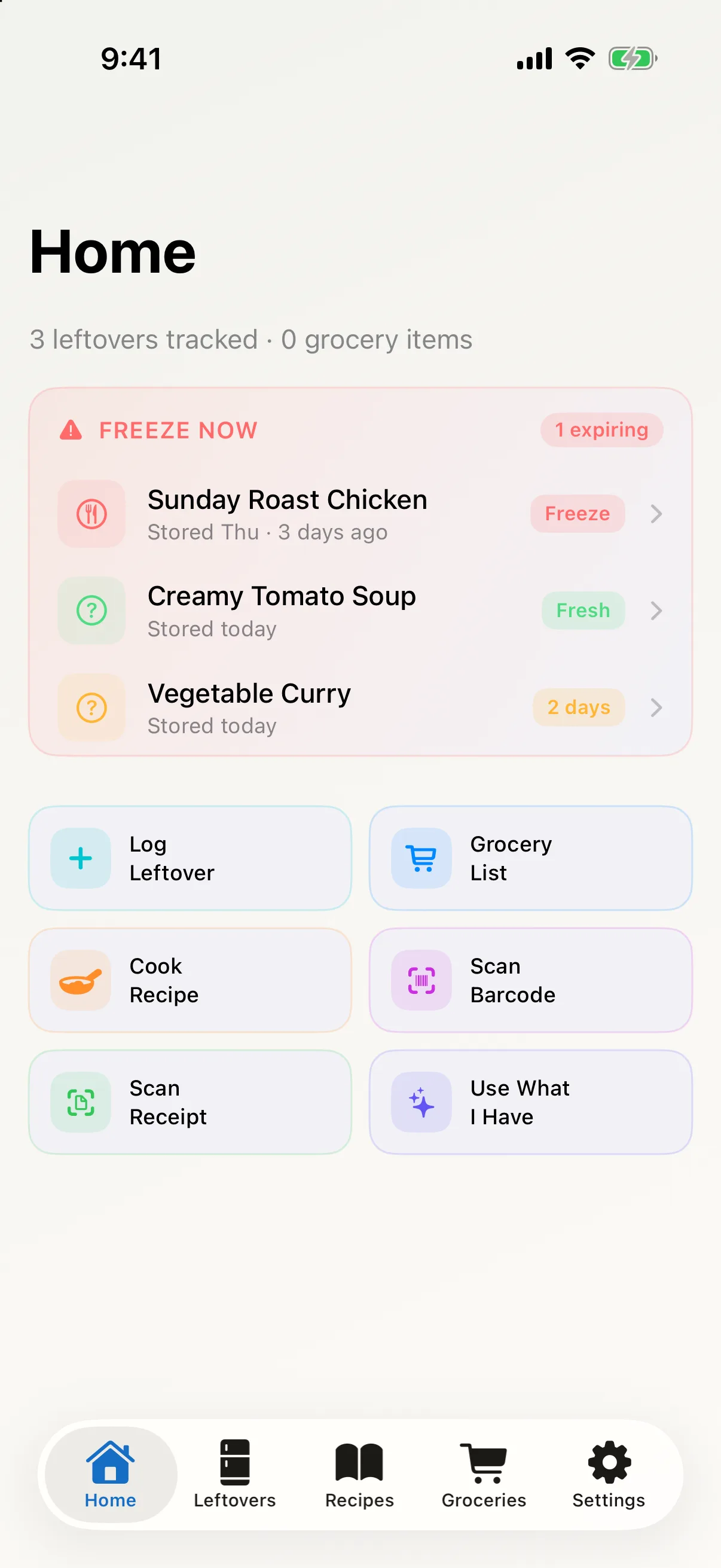
Current release shown · version 2.3 coming soon
Built around the Apple tools already in your kitchen.
Coming in version 2.3 · Pro
Start with an idea, a question or the ingredients in your kitchen. Kitchen Assistant brings recipe creation and practical nutrition guidance into one conversation.
Ask for dinner in your own words. Follow up to swap an ingredient, change servings or make the meal dairy-free.
Build several dishes in the same conversation. Each gets its own recipe to review, refine and save to your Recipe Book.
Review what’s missing against your recorded kitchen items, add it to groceries, then open Cook for the recipe steps.
Ask for more protein, more fibre or a lighter preparation. Get practical ingredient and cooking suggestions, grounded in recorded food facts where available.
See what’s included in ProA warm, hearty main with herbs and lemon.
A crisp side to share alongside it.
Your next steps: save recipes · buy what’s missing · cook
From fridge to table
No more forgotten containers, scattered recipe links or duplicate grocery notes. Turn what your household already has into a practical plan.
Log leftovers, pantry staples and groceries in seconds. Scan a barcode or receipt when that’s faster.
See what to eat, freeze or discard next, with reminders shaped by what it is and how it’s stored.
Get ideas from your recipes and what’s on hand, then send missing ingredients to your grocery list.
Free kitchen essentials. No subscription.
01 / USE IT FIRST
Bubble & Squeak turns a crowded fridge into clear next actions—from Eat Today and Freeze Now to Discard Now—and can remind you before a window closes.
Timing guidance is a planning aid, not medical food-safety advice. When in doubt, discard.
 From leftovers to a family favorite

Recipe library in the current release
02 / YOUR RECIPE BOOK
Keep family favorites, add your own recipes and import supported links. In 2.3, recipes you create with Kitchen Assistant will join the same Recipe Book, ready for another day.
Review ingredients and steps before you save a recipe.
Import facts from supported recipe pages and review before saving.
Keep recipes to yourself or share them when you choose.
The connected kitchen
Thoughtful connections turn everyday kitchen admin into a simple household rhythm.
Send missing ingredients to a grocery list backed by Apple Reminders, so they stay useful beyond the kitchen.
Invite the people you cook with and keep household recipes, leftovers and kitchen inventory in sync through iCloud.
Use a barcode or receipt to move real-world groceries into your kitchen plan.
See what to use soon or cook next from widgets, Spotlight and quick actions on your iPhone or iPad.
Designed for Apple
Private by default. Invite your household when you’re ready.
Keep the grocery list visible in an app your household already knows.
Use supported Apple Intelligence features when they’re available.
Built for both iPhone and iPad, with the same kitchen in sync.
Arriving in version 2.3
Keep your kitchen organized for free. Choose Pro for more importing, scanning and AI cooking tools, with one purchase and no subscription.
Your everyday kitchen
$0 to download and use
Everything you need to track what’s there, use it in time and shop together.
Sample allowances are stored on each device and do not renew monthly. Receipt, dish and recipe scans, including recipe text extraction, share one allowance.
More help at mealtimes
$19.99 once · US price
Bring more recipes into your kitchen and turn what you have into new ideas.
Coming in version 2.3
Buy in the app when available. The App Store shows your local price before purchase.
Already here? Customers whose App Store history confirms they first got Bubble & Squeak before version 2.3 keep access to these Pro features at no charge.
Pro can be shared with up to five other eligible members of your Apple Family Sharing group when purchase sharing is enabled. Joining an in-app household does not share a purchase.
AI uses supported Apple Intelligence features or your own external provider API key. Provider usage may be billed separately; Pro does not include cloud AI credits. Availability depends on your device and chosen provider.
Good to know
Need a hand? Visit support for quick fixes and troubleshooting steps.
Coming in version 2.3, Kitchen Assistant brings cooking and nutrition questions into one place. Talk or type, make follow-up changes and turn the conversation into one or several recipes. Each dish can be reviewed, saved to your Recipe Book, used for a grocery shortfall check and opened in Cook. Version 2.3 is not yet available on the App Store.
Ask for practical changes such as adding a source of protein or fibre, reducing richness, or adjusting ingredients for a dietary preference. Kitchen Assistant uses recorded food facts when available. It does not fill in missing data with invented calorie or nutrient totals.
No. In 2.3 you can type throughout the conversation. Voice is optional, needs microphone permission and a supported device language, and works while Kitchen Assistant is open. Speech is transcribed on your device; the app does not save microphone audio. If you choose an external AI provider, the conversation text and relevant kitchen context are sent to that provider.
Yes. Tracking leftovers, reminders, manual recipes, pantry items, shared groceries and household sync stay free. Version 2.3 will add sample imports and scans plus an optional $19.99 one-time Pro purchase in the US. Local App Store prices vary. There is no subscription.
If your App Store history confirms you first got Bubble & Squeak before version 2.3, you keep these Pro features at no charge. Use Restore Purchases in the app if your existing access is not recognized.
Pro unlocks the app’s advanced AI cooking tools. Supported Apple Intelligence features run on compatible devices. External providers use your own API key and may charge separately under their terms; cloud AI credits are not included.
No. Leftover tracking, recipes, pantry, groceries and household sharing work without it. Apple Intelligence powers supported AI and scan features when available; external AI providers are optional.
Household recipes, leftovers and other kitchen data sync through iCloud. Your household starts private, and the owner can invite others when ready. Grocery-list collaboration is set up separately in Apple Reminders. In version 2.3, a Pro purchase can also be shared through Apple Family Sharing with up to five other eligible family members. That is separate from an in-app household invitation.
Import works with supported pages that provide structured recipe data. You review the ingredients, times, servings and source before saving; unsupported pages are clearly identified.
Bubble & Squeak offers timing guidance based on food type, cooking date and storage. It is not medical food-safety advice. When in doubt, discard.
iPhone and iPad running iOS or iPadOS 26 or later. An iCloud account is needed for household setup and sync.
Ready when dinner isn’t
Bubble & Squeak helps your household find it, use it and remember the rest.
Download free on theApp StoreKitchen Assistant and Pro are coming in version 2.3.